
Scene & Heard3.14.1 - App Store
You'll be able to see results in few seconds.
Publisher Description
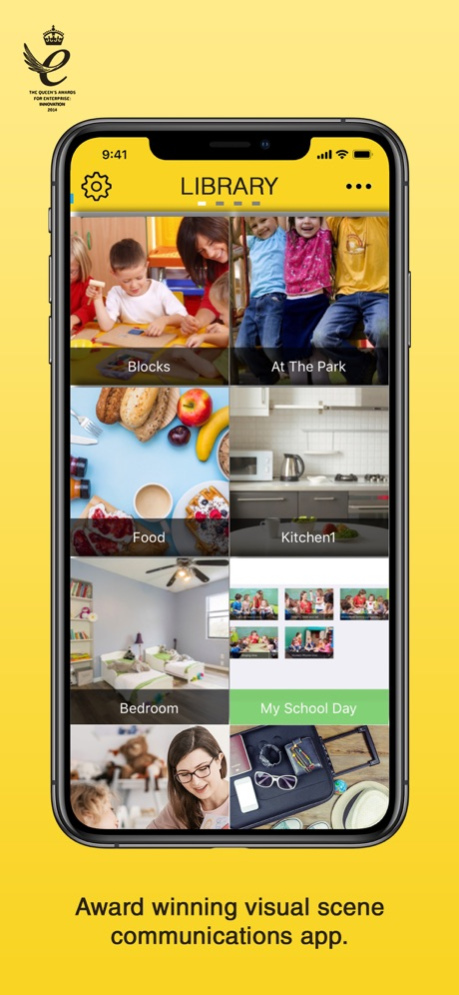
Scene & Heard is an award winning app. It is a visual scene based communication aid which provides communication in context and new learning aids with interactive features. Scene & Heard is designed to cater for a range of needs, starting with simple single message based communication to sophisticated interlinking scenes with a range of interactive features.
Whether you are a parent, therapist or carer, the easy-to-use interface will help you import photos and allocate actions to any scene. Personalise each scene with fun and interactive options including audio messages, video clips and Widgit symbols. You are even able to draw your own scenes with the drawing/paint tool. Use scene links to transition to a new scene and tell a story within the app.
Top Features:
- Record your own voice messages for scenes or use the inbuilt text to speech voice
- Create or import short video files
- Choose and use over 12000 engaging Widgit symbols to use to support communication
- Create hotspots (tagging an element on the scene) and allocate actions, so that the picture is truly interactive
- Task prompter allows you to give step by step instructions for any task using audio or video.
- Schedule a task using the in app scheduler - an interactive calendar which connects to different pages according to the different tasks.
- Link scenes to create a sequence of events, support narrative or to reinforce cause and effect concepts
- Try out some of the pre-built scenes in the scene library, and then easily create your own scenes
- Easy to use photo library to find your scenes
- Create communication books to share and print.
- Share your scene on Facebook or Twitter
- Switch accessible with a Therapy Box Switch Box or an RJ Cooper switch interface
- Use the whole screen as a switch in "touch anywhere" mode. Uses scanning to highlight the active areas and the person using the app can tap anywhere to make their choice
"Very helpful for children with Autism... assisted my patients with reducing communication breakdowns and frustration due to limited language skills" (Children's Specialized Hospital)
"Its versatility lends itself to satisfying many communication needs to users of a variety of levels" (Assistive Technology Specialist)
Clinicians and parents have said you can use Scene & Heard in many ways, here are a few examples:
- single message communication aid
- communication passports
- step-by-step videos and instructions for completing daily tasks
- use in the community, e.g. ordering coffee
- creating therapy tools
- teaching basic concepts such as cause/effect
- video diaries
- home / school liaison
- social stories
- narrative support
- interactive education games
- interactive email messages to family/talking video postcards
VOLUME PURCHASE PROGRAM
Educational institutions are eligible for a 50% educational discounts through Apple's volume purchase program.
Dec 19, 2019
Version 3.14.1
iOS 13 Fix
About Scene & Heard
The company that develops Scene & Heard is Therapy Box Limited. The latest version released by its developer is 3.14.1.
To install Scene & Heard on your iOS device, just click the green Continue To App button above to start the installation process. The app is listed on our website since 2019-12-19 and was downloaded 0 times. We have already checked if the download link is safe, however for your own protection we recommend that you scan the downloaded app with your antivirus. Your antivirus may detect the Scene & Heard as malware if the download link is broken.
How to install Scene & Heard on your iOS device:
- Click on the Continue To App button on our website. This will redirect you to the App Store.
- Once the Scene & Heard is shown in the iTunes listing of your iOS device, you can start its download and installation. Tap on the GET button to the right of the app to start downloading it.
- If you are not logged-in the iOS appstore app, you'll be prompted for your your Apple ID and/or password.
- After Scene & Heard is downloaded, you'll see an INSTALL button to the right. Tap on it to start the actual installation of the iOS app.
- Once installation is finished you can tap on the OPEN button to start it. Its icon will also be added to your device home screen.
Program Details
System requirements
Download information
Pricing
Version History
version 3.14.1
posted on 2019-12-19
Dec 19, 2019
Version 3.14.1
iOS 13 Fix
version 3.14.1
posted on 2019-12-19
Dec 19, 2019 Version 3.14.1
iOS 13 Fix
version 3.5
posted on 2011-05-18
version 3.14.1
posted on 1970-01-01
19 Thg 12, 2019 Version 3.14.1
iOS 13 Fix
version 3.14.1
posted on 1970-01-01
19 de dic. de 2019 Version 3.14.1
iOS 13 Fix
version 3.14.1
posted on 1970-01-01
19. Dez. 2019 Version 3.14.1
iOS 13 Fix
version 3.14.1
posted on 1970-01-01
19 дек. 2019 г. Version 3.14.1
iOS 13 Fix
version 3.14.1
posted on 1970-01-01
2019年12月19日 Version 3.14.1
iOS 13 Fix
version 3.14.1
posted on 1970-01-01
19 de dez de 2019 Version 3.14.1
iOS 13 Fix
Disclaimer
Official App Store Link
We do not host Scene & Heard on our servers. We did not scan it for viruses, adware, spyware or other type of malware. This app is hosted by Apple and passed their terms and conditions to be listed there. We recommend caution when installing it.
The App Store link for Scene & Heard is provided to you by apps112.com without any warranties, representations or guarantees of any kind, so access it at your own risk.
If you have questions regarding this particular app contact the publisher directly. For questions about the functionalities of apps112.com contact us.
